Description
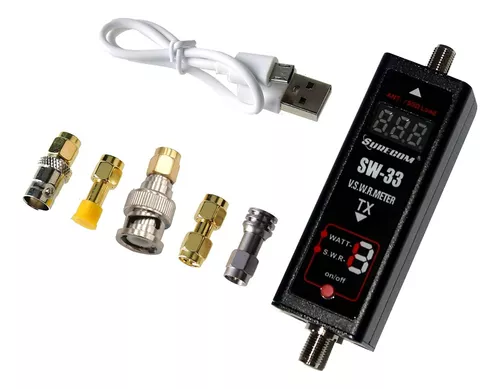
Gam3Gear SURECOM SW-33 Mark II 100 W 125-525 Mhz Mini Digital VHF UHF Handheld Two-Way Radio and SWR Meter
SURECOM SW-33 Mark II 125-525 Mhz Mini Digital VHF/UHF Power and SWR
VSWR meter. Direct digital readout of forward feed, without any calibration.
Maximum measurable power range of up to 100 W.
Check your SWR antenna in 3 seconds, also check the strength of your RF radio.
Easy to install portable radio.
Features:
– VSWR. Advanced power direct digital readout, without any calibration.
– Max. Measurable power range up to 100 W. – Check your SWR antenna in 3 seconds, also check your RF radio watt power.
– Easy to install handheld radio
Specifications:
– Measurable power range: 0.1-100 W.
– Max. Power: 100W Accuracy: Medium +/- 5%
* Not suitable for DMR digital radio.
-Max. Power in: 100 W.
– V.S.W.R: 1.00~19.99
– Frequency range: cover – 125 MHz ~ 525 MHz
– Insertion loss: <0.15 dB (VHF) , <0.25 dB (UHF)
– Temperature: 32.0 °F~158.0 °F
– Integrated battery: lithium-ion
battery- Size: (SMA): 0.984 x 0.984 x 2.362 in
– Power: 5 V (micro USB)
– Interface (inside and outside): SMA female
– Impedance: 50 Ohm
– Weight: 5.64 oz
Features Function
Press the red button and hold for 3 seconds to “Power” and “SWR mode”
Press red button -“Power Meter”
Press red button -“SWR mode”
Press the red button and hold – “Off”
How to use the power
meter Red button push-button -switch
Press the red button at the same time for “power meter”
modeConnect the SMA (TX brand) to the radio output.
Connect the SMA to the DUMMUY load
Caution:
Use the correct simulated load, high power will damage the simulated load.
How to use the SWR
meter Press the red button – “Power” and “SWR” mode.
Connect the SMA (TX mark) to the radio output.
Connect the SMA to the antenna
When the LED shows 1.00 to 1.50, it means that the antenna adapts to the frequency,When
the LED shows 1.50 to 3.00 inches, it means that the antenna does not adapt well to the frequency,When
the LED is displayed up to 5.0 to 19.99, it means that the antenna does not adapt to the frequency.